
Java Fundamentals: Small Practice Programs
Several compact Java exercises covering nested loops, a multiplication table, sparse-array conversion, restoration, and two-dimensional array output.
Contents5 sections
After working through the material up to arrays in one day, I used a few small programs to consolidate the basics.
Printing a triangle
This example uses nested loops to print a centered triangle. The first commented implementation is a simpler shortcut; the active version prints both halves of each row.
public class Triangle {
    public void triangle() {
        /*
        for (int i = 0; i < 9; i++) {
            for (int j = 9; j > i; j--) {
                System.out.print(" ");
            }
            for (int j = 0; j < i; j++) {
                System.out.print("* ");
            }
            System.out.println();
        }
        */

        for (int i = 0; i < 9; i++) {
            for (int j = 9; j > i; j--) {
                System.out.print("  ");
            }
            for (int j = 0; j < i; j++) {
                System.out.print("* ");
            }
            for (int j = i - 1; j > 0; j--) {
                System.out.print("* ");
            }
            System.out.println();
        }
    }
}
Printing the 9×9 multiplication table
The inner loop runs only as far as the current row, producing the familiar triangular table.
public class Multiplication {
    public void multiplication() {
        for (int i = 1; i <= 9; i++) {
            for (int j = 1; j <= i; j++) {
                System.out.print(i + "*" + j + "=" + i * j + "\t");
            }
            System.out.println();
        }
    }
}
Converting a normal array to a sparse array
The first row records the original row count, column count, and number of non-zero values. Each remaining row stores one non-zero cell as row, column, and value.
public class SparseArray {
    public int[][] sparseArray(int[][] source) {
        int count = 0;

        for (int i = 0; i < source.length; i++) {
            for (int j = 0; j < source[i].length; j++) {
                if (source[i][j] != 0) {
                    count++;
                }
            }
        }

        int[][] sparse = new int[count + 1][3];
        sparse[0][0] = source.length;
        sparse[0][1] = source[0].length;
        sparse[0][2] = count;

        count = 0;
        for (int i = 0; i < source.length; i++) {
            for (int j = 0; j < source[i].length; j++) {
                if (source[i][j] != 0) {
                    count++;
                    sparse[count][0] = i;
                    sparse[count][1] = j;
                    sparse[count][2] = source[i][j];
                }
            }
        }
        return sparse;
    }
}
Restoring the original array
Allocate an array using the dimensions stored in the first sparse row, then place each recorded value back at its saved coordinates.
public class RestoreArrays {
    public int[][] restoreArrays(int[][] sparse) {
        int[][] restored = new int[sparse[0][0]][sparse[0][1]];
        for (int i = 1; i < sparse.length; i++) {
            restored[sparse[i][0]][sparse[i][1]] = sparse[i][2];
        }
        return restored;
    }
}
Printing a two-dimensional array
public class OutArrays {
    public void outArrays(int[][] values) {
        for (int i = 0; i < values.length; i++) {
            for (int j = 0; j < values[i].length; j++) {
                System.out.print(values[i][j] + "\t");
            }
            System.out.println();
        }
    }
}
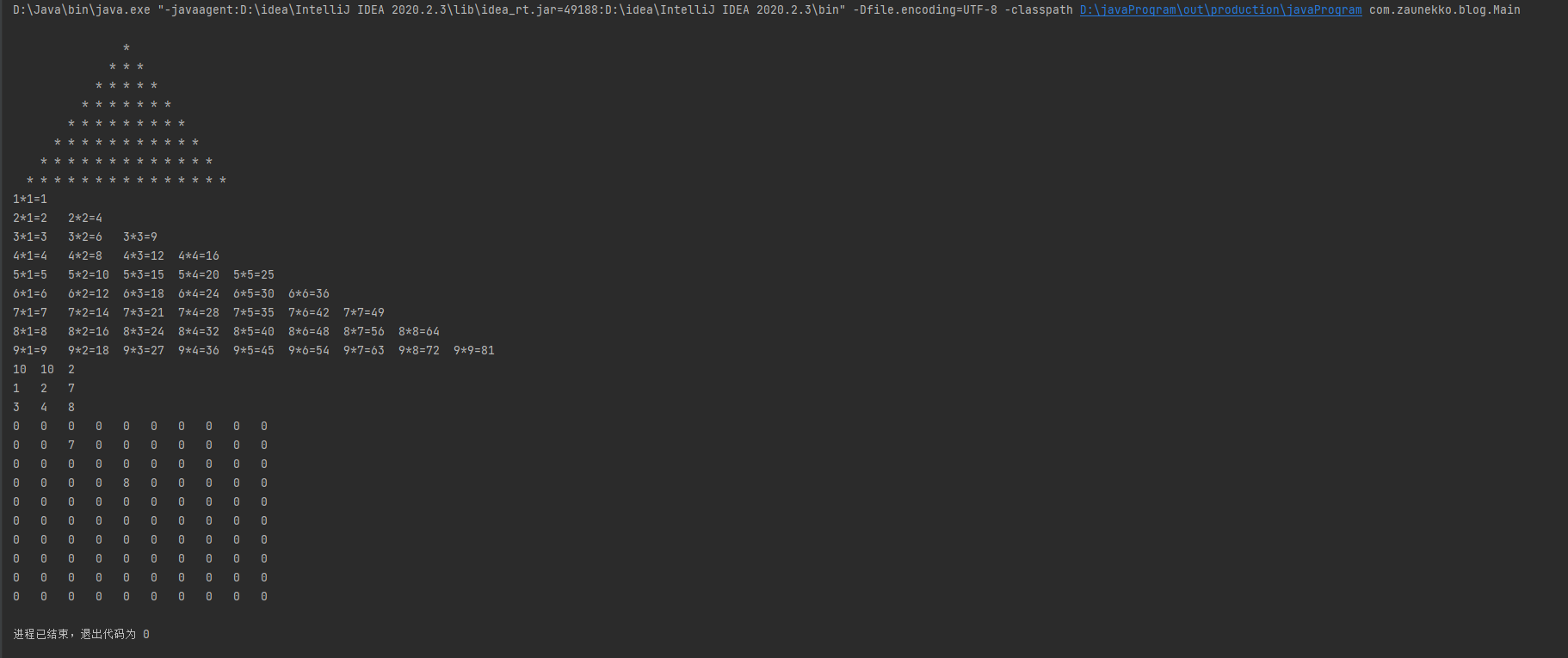
The resulting conversion and restoration can be checked visually:
Related posts
Discussion / approved
Comments
No comments yet.